Video Frames Extraction for VLM
introduction
While some VLM now natively supports video like Qwen2.5VL and InternVL3 when using the transformers library, using the same models via a third party provider still requires you to pass in the video frames individually as base64 encoded strings.
Simon Willison recently added a llm-video-frames plugin to his popular llm python package.
The plugin basically uses ffmpeg to extract frames at the given fps and optionally overlay timestamp on top of each frame. The interesting part is that he built it using o4-mini.
In the spirit of his bad vibe post:
what’s the point of vibe coding if at the end of the day i still gotta pay a dev to look at the code anyway. sure it feels kinda cool while i’m typing, like i’m in some flow state or whatever, but when stuff breaks it’s just dead weight. i cant vibe my way through debugging, i cant ship anything that actually matters, and then i’m back to square one pulling out my wallet for someone who actually knows what they’re doing. u/AssafMalkiIL, on r/vibecoding
and how replacing juniors with AI might be a bad idea:
I was at a leadership group and people were telling me “We think that with AI we can replace all of our junior people in our company.” I was like, “That’s the dumbest thing I’ve ever heard. They’re probably the least expensive employees you have, they’re the most leaned into your AI tools, and how’s that going to work when you go 10 years in the future and you have no one that has built up or learned anything?
Matt Garman, CEO, Amazon Web Services
Let’s build our own solution using FFMPEG!
using FFMPEG
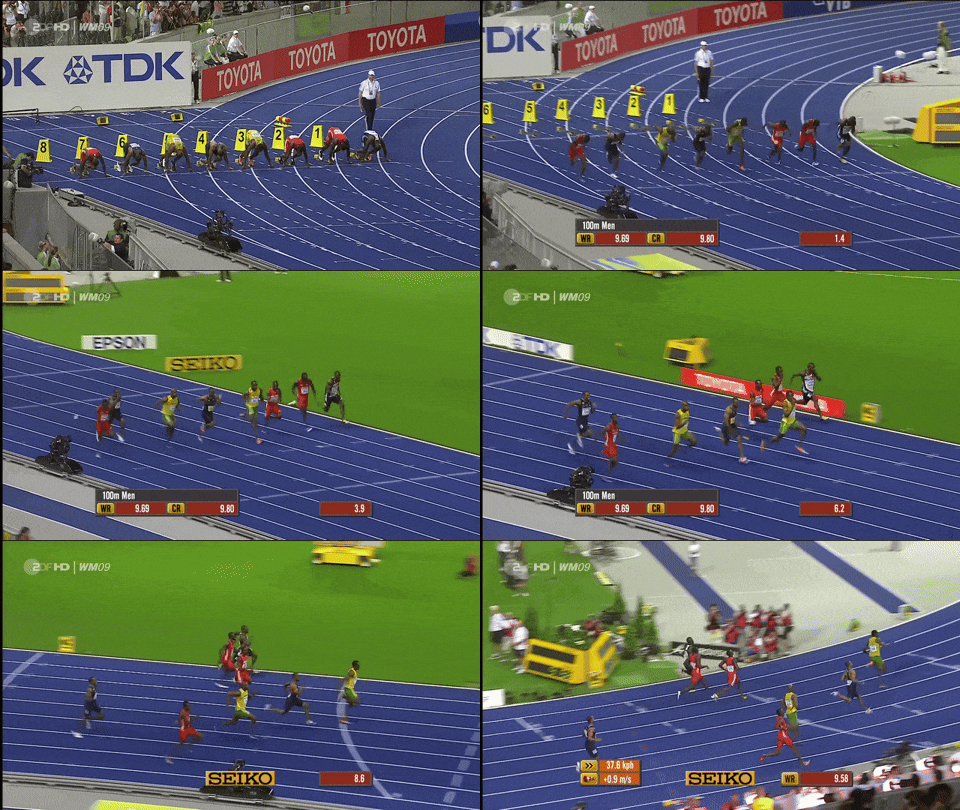
test video
to illustrate the video frame sampling we are going to use a 10-second segment from this Youtube video starting at the 00:17 mark:
overlaying timestamp
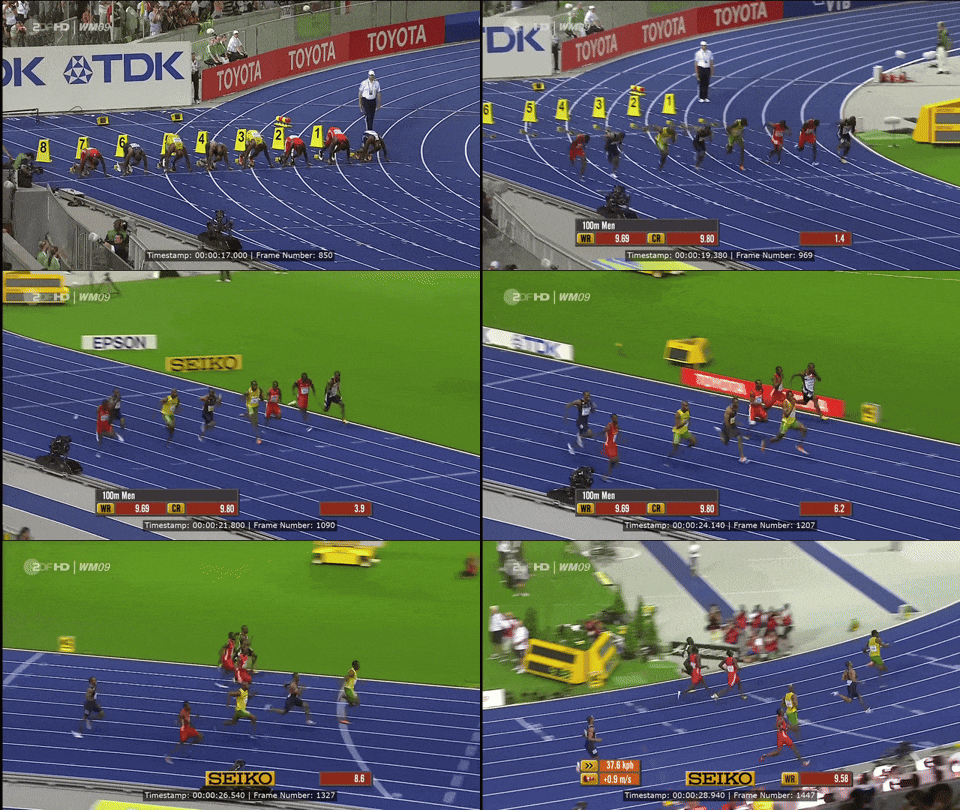
overlaying a timestamp can be done using the drawtext filter:
ffmpeg -ss 17 -i source.mp4 -t 12 \
-vf "drawtext=text='Timestamp\:%{pts\:hms} \| Frame Number\: %{frame_num}': x=(w-tw)/2: y=h-(2*lh): fontcolor=white: fontsize=20: box=1: boxcolor=0x00000099: boxborderw=5" \
output.mp4- 1
-
as mentioned above, we are only taking a second segment from the source, therefore the
-ssand-toptions are used to specify the start time and duration of the segment.
Here’s some details of the key parts to this filter:
drawtext=text='Timestamp\:%{pts\:hms} \| Frame Number\: %{frame_num}'overlays the current timestamp and frame number on the video frame.xandyspecify the position of the text on the video frame (here centered at the bottom of the frame)fontcolorspecifies the color of the text2fontsizespecifies the size of the textbox=1andboxcolorhere add a background box around the text, currently it’s set to semi-transparent but could be set to a solid color (e.g.boxcolor=black)boxborderwspecifies the width of the border around the box
which produce something like this:
adding custom FPS
Because of memory limitations, context window size, and inference time consideration, for video understanding tasks we don’t normally sample the real FPS of the video. On top of that most VLMs are either trained on videos that are sampled uniformly3 with some newer models adopting dynamic FPS sampling4 to ensure robustness and adaptability across a wide range of video content and frame rates.
That means that for long video understanding, sampling at 1-2 FPS would most likely be sufficient. And for short-form content with fast moving scenes (like our example here) perhaps a higher sampling rate of 4-8 FPS would be better.
Therefore, a custom FPS value is a key feature and can be easily added to our filter with a fps=<custom_fps>:
ffmpeg -ss 17 -i source.mp4 -t 12 \
    -vf "fps=2, drawtext=text='Timestamp\:%{pts\:hms} \| Frame Number\: %{frame_num}': x=(w-tw)/2: y=h-(2*lh): fontcolor=white: fontsize=20: box=1: boxcolor=0x00000099: boxborderw=5" \
    output.mp4
here’s a comparing of two resulting videos sampled at 2 and 8 FPS:
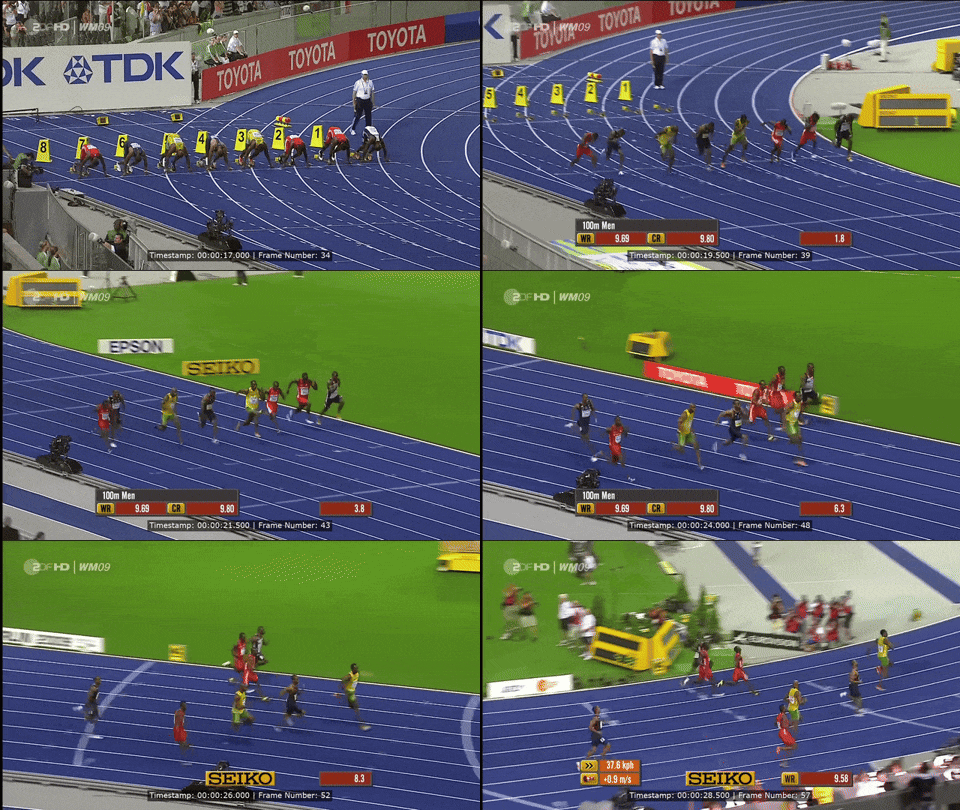
fps=2
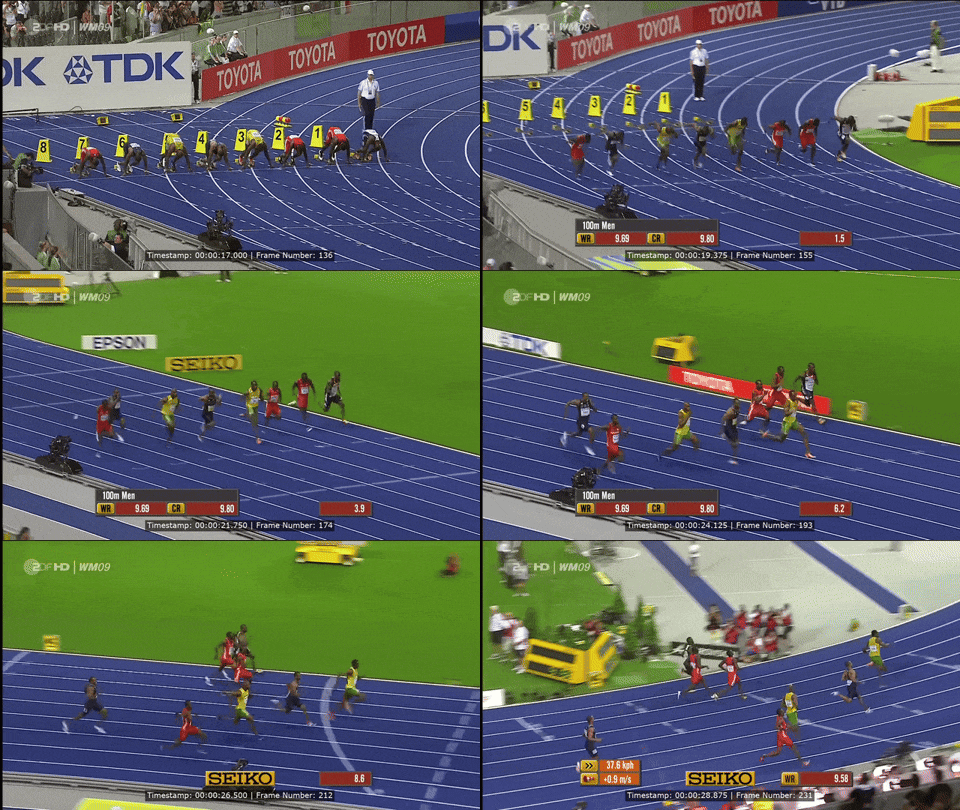
fps=8
frame resolution
aside from frame rate, it’s also worth considering rescaling the frame resolution. For example to 1080p resolution, we can set the short edge to 1080 by adding scale='if(lt(iw, ih), 1080, -2)':'if(lt(ih, iw), 1080, -2)' to the filter above:
ffmpeg -ss 17 -i source.mp4 -t 12 \
    -vf "scale='if(lt(iw, ih), 1080, -2)':'if(lt(ih, iw), 1080, -2)', fps=2, drawtext=text='Timestamp\:%{pts\:hms} \| Frame Number\: %{frame_num}': x=(w-tw)/2: y=h-(2*lh): fontcolor=white: fontsize=20: box=1: boxcolor=0x00000099: boxborderw=5" \
    output.mp4
Most VLM these days utilize an “adaptive windowing algorithm”5 on image inference which effectively enables the model to zoom in on smaller details in the images6. So one might be tempted to provide the highest image resolution.
For instance, Qwen2.5VL’s visual input limit per image is 16,384-token7, which means that you could fit a 4k image (~12,000-token) comfortably. This is ideal when working with single (or few images).
However, when working with videos, we need to consider the model’s context window size. At 32k-token context window8, we could only fit about 10 4k images or around 50 1080p images.
dynamic frame rate and resolution
So in practice, the right frame rate and resolution to use will depend on the use-case:
- images: highest resolutions possible to ensure granular details are captured in the images, taking full advantage of the model’s “adaptive windowing algorithm”.
- videos:
- resolution: max 1080p or maybe even 720p for longer videos since most videos these days are delivered as mobile content
- frame rate: adaptive
- higher (4-8 fps) for shorter, fast pace videos (<1 minutes)
- lower (1-2 fps) for longer videos (>3 minutes)
Understading Image Token Cost
To understanding VLM’s image cost, one have to first understand that Vision Transformer process images by dividing it up into patches9.
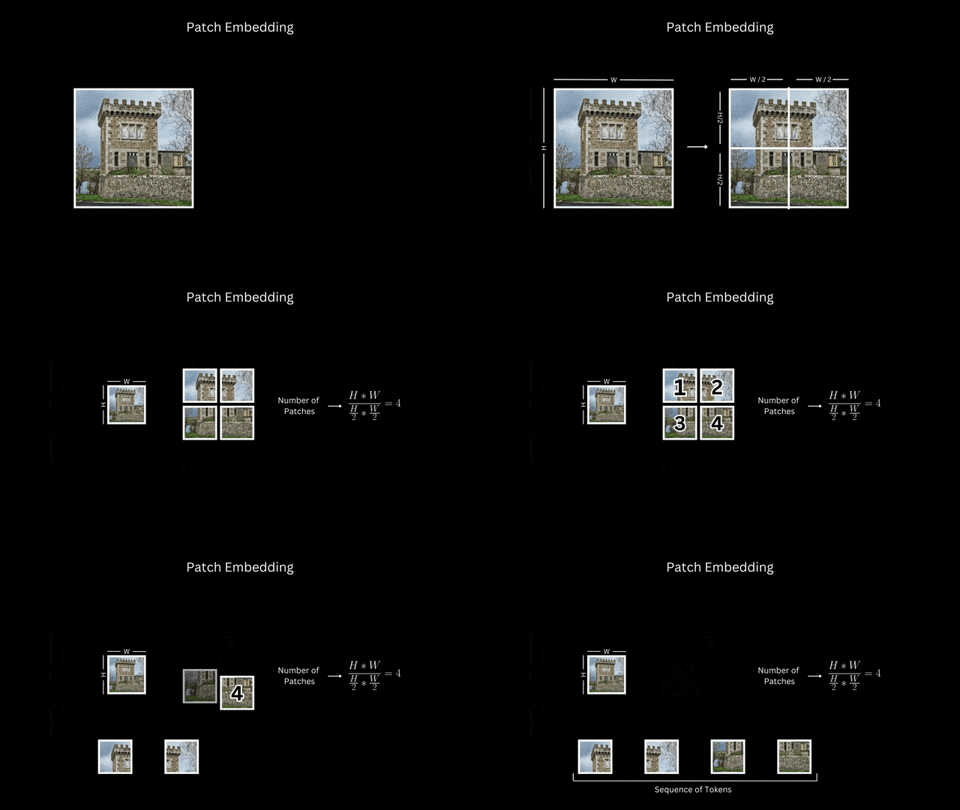
And so the computation of tokens per image is fairly simple…
Let:
- \(W\) = image width (pixels)
- \(H\) = image height (pixels)
- \(P\) = patch size (pixels per side, assume square patches)
- \(T\) = tokens per patch (constant, e.g., 258 for Gemini models)
Then, the total number of image tokens is: \[ \text{Image Tokens} = [\frac{W}{P}] \times [\frac{H}{P}] \times T \]
But the complication comes from the fact that each model has its own:
Picking a VLM for Video Understanding
picking a VLM for video understanding then, is a puzzle of optimizing for:
- Capability: the model has to be capable enough to describe and extract information with temporal awareness
- Context Window and Token Limits: has to be large enough to handle couple hundreds (short form videos <2-minute) to upward of a thousand frames (longer videos >2-minute)
- Cost: has to be economical enough to process videos at scale15
Taking into consideration all three factors, the best model at the time of writing is Gemini 2.0 Flash16.
And here’s a brief comparsion of the cost and frame count against different video lengths for Gemini 2.0 Flash17 assuming a dynamic frame sampling strategy:
| Resolution | Tiles per Image | Tokens per Image | Images in Context Window |
|---|---|---|---|
| 4K (3840×2160) | 15 | 3,870 | 258 |
| 1080p (1920×1080) | 6 | 1,548 | 646 |
| 720p (1280×720) | 2 | 516 | 1,937 |
| Video Duration / FPS | Number of Frames | Input Cost ($) |
|---|---|---|
| 30 seconds @ 8 fps | 240 | 0.00619 |
| 90 seconds @ 4 fps | 360 | 0.00929 |
| 3 minutes @ 1 fps | 180 | 0.00464 |
| 9 minutes @ 0.5 fps | 270 | 0.00697 |
future proving
As of this writing, Gemini just launched nano banana.
VLMs are getting more capable, more efficient to run, and cheaper every few weeks.
And new models are already starting to natively support videos20, which might be coming soon to OpenRouter. So all these dynamic frame sampling, image tokenization, and context length computation might just be a theoretical exercise in the near future!
Resources
- Gemini Cookbook and Gemini Vision’s offical doc
- Gemma’s guide to Video Understanding
- Using Gemini 2.0 Flash for Audio Transcription
- Reverse Engineering GPT-4o’s 170 Image Patch Token count number
- Simon Willison’s Image Tokens Calculator (part of his LLM tools)
- An OpenAI Image Tokens Calculator
- Anthropic’s guide to calculating image cost
- fireworks AI’s image tokens guide
Footnotes
gif generated using
yt-dlp -f "bv*[ext=mp4][height<1080]" "https://youtu.be/HFLuduKmnW0?si=O5haMmNlZywV-Grn" -o - \
| ffmpeg -i pipe:0 -ss 17 -t 12 -f yuv4mpegpipe - \
| gifski -o ~/Downloads/100mWR.gif -
see the Youtube Video to Giphy post for more details↩︎
The
fontfileoption in FFmpeg’s drawtext filter is not mandatory if your FFmpeg build is configured with fontconfig support (--enable-libfontconfig)↩︎the models are typically trained by sampling a fixed number of frames evenly distributed across the input video’s length, regardless of the original FPS (e.g. InternVL3) or 1 FPS as per the case of Gemma 3 and Gemma 3n↩︎
meaning the number of frames per second sampled from each video varies (e.g. Qwen2.5VL)↩︎
see section 2.1 in the Gemma 3 paper.↩︎
see details in the Gemma 3 release blog post↩︎
see details on alibaba cloud’s doc↩︎
as is the case for Qwen2.5VL, Gemma 3 and Gemma 3n↩︎
read more about Vision Transformer Image Tokenization here or watch a 5-minute video. The huggingface article, Visualizing How VLMs work is a great starting point if you want to dive deep into the topic.↩︎
for example Gemini 2.X uses 768x768 (for images short edge >384pixels, see Gemini Docs), Qwen2.5VL uses 28x28, and GPT-4o uses 512x512 (see this deep dive)↩︎
Gemini 2.X counts 258 tokens per patch, Qwen2.5VL counts 1 token per patch, and GPT-4o counts 170 tokens per patch (see this deep dive)↩︎
Gemini 2.X offers 1mm tokens, Qwen2.5VL offers 32k tokens (via OpenRouters), and GPT-4o offers 128k tokens (via OpenRouters)↩︎
Qwen2.5VL has 16,384-token (~1.5x 4k resolution, see doc), while Gemini 2.X and GPT-4o just have a max request size of 20MB↩︎
Gemini 2.X max of 3,600 images, Qwen2.5VL max of ~60 HD images, and GPT-4o max of 10 images↩︎
here’s a small tool that I vibe coded for comparing cost and context windows on all models available on OpenRouter↩︎
turns out it’s also one of the few models with audio input support on OpenRouter and the audio transcription looks decent. On Video Understanding it passed my “vibe check”, and as I quote Rishabh Agarwal
In a world that’s changing so fast, the biggest risk you can take is not taking risks.So the best move right now is to build with Gemini 2.0 Flash while keeping the codebase model agnostic (as much as possible)↩︎
interestingly for Gemini 2.0 Flash OpenRouter charges a fix cost per image of $0.0258/K input images (as of the time of this writing), instead of charging for image tokens… this means that in theory you could stitch together multiple images to save cost; but who knows when that might change…↩︎
Gemini 2.0 Flash uses 768x768 per image patch, 258 tokens per patch, and 1 million tokens context window.↩︎
interestingly for Gemini 2.0 Flash OpenRouter charges a fix cost per image of $0.0258/K input images (as of the time of this writing), instead of charging for image tokens… this means that in theory you could stitch together multiple images to save cost; but who knows when that might change…↩︎
as mentioned Qwen2.5VL and InternVL3 but also Gemini’s video handling is pretty impressive!↩︎