UV for python dependencies
why uv?
three simple answers:
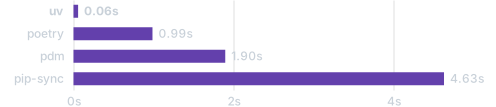
trio package
- it’s fast1
- if it’s good enough for streamlit cloud it’s good enough for me
- good for packaging2 and virtual environments are stored in project directories
installation
macOS and Linux: curl -LsSf https://astral.sh/uv/install.sh | sh
Or pipx install uv
confirm the installation with uv --version
python versions
uv manages it’s own python versions much like pyenv
use uv python list to view installed and available python version and uv python install 3.8 to install a specific version3.
Virtual Environments
unlike pyenv4, when you run uv venv5 an environment will be created in your current working directory in .venv this allows you to keep each project’s dependencies isolated. To activate the environment just source .venv/bin/activate. And to deactivate, just deactivate.
To install just append uv in front of your standard pip install command. For example, uv pip install -r requirements.txt and to see what’s installed, uv pip list. Commands such as these that mutates environments will always applied in the following order:
- the activated environment
- the environment at
.venvin the current directory
Tools
Tools are python packages that provides a CLI and uv has a dedicated interface for invoking them without installation.6
In most cases, executing a tool with
uvx7 is more appropriate than installing the tool.
Scripts
when creating scripts, uv supports the creating and editting of inline script metadata.
When you uv run your_script.py an environment with the specific dependencies will be created8:
uv init --script example.py --python 3.12
uv add --script example.py 'requests<3' 'rich'- 1
-
the script
example.pywill be created with inline metadata withrequires-python = ">=3.12" - 2
-
the
requests<3andrichdependencies will be added to the inline metadata inexample.py
cleaning cached virtual environments
When running scripts or calling a tool with uvx virtual environments are stored in the uv cache directory9 and are treated as disposable. You can clean them out by:
uv cache prune: safely removes unused cache entries while respecting locksuv cache clean: clears all cached entries and have uv rebuilds on the next run
Existing Projects
because of the tools feature, you can call the migrate-to-uv package on your existing project to have uv manage the dependencies (no installation required ;):
uvx migrate-to-uvyou can add the --dry-run flag to see what it would do but basically it will read your requirements.txt (and also removes it) and create a pyproject.toml10 and a uv.lock file11 for your project.
and if you need to export the environment back to requirements.txt you could12:
uv export --no-hashes --format requirements-txt > requirements.txtNew Projects
you can run uv init new-project to have uv create everything for you.
there are a few different variations:
- an Application
- great for writing scripts, web services, and CLI tools
- it’s the default when you run
uv init example-app(the--appflag is implied)
- a Package: for things that are mean to be “pip-installable”
- Application
- running
uv init --package example-pkgwill create a setup with a build system and command definition.
- running
- Library
- library provides functions and objects for other projects to
import - can be created with
uv init --lib example-lib(--libimplies--package) - a build system is defined but not a command definition
- library provides functions and objects for other projects to
- Application
a minimal project
using the --bare flag gives you the most basic project structure. Here’s an example:
mkdir new-project
cd new-project
uv init --bare              # this only creates pyproject.toml
uv venv --python 3.12       # this creates an environment at .venv using python 3.12
uv add awesome-package1     # add your project's requirements
References
Footnotes
about 115x faster than
pip, in the time it takes to runpip installon your next project you can probabaly read this post and learn all the basics to get started.↩︎when you
uv removesomething, no dangling packages are left behind, you can inspect after withuv tree↩︎add
export UV_PYTHON_INSTALL_DIR=$HOME/your/custom/home/for/.uv/python/to your~/.bashrcto control where those managed python versions get installed to↩︎pyenv’s virutal environment are installed by default to~/.pyenv/versions/<env-name>/↩︎or use
uv venv --python 3.12to create a virtual environment with python 3.12↩︎basically trying to cover the same use-case for
pipx. For tools that are commonly called, inuvcould install them.↩︎uvxis an alias foruv tool run↩︎even when the script is ran within the project, the project dependencies will be ignored (i.e. the inline script metadata has precedence over the project dependencies)↩︎
run
uv cache dirto see where that is on your machine.↩︎for an existing project, you might want to update the value for
nameand also add therequires-pythonfield (with a value like>=3.8)↩︎the lockfile contains the exact resolved versions that are installed in the project environment and is meant to be checked into version control; So that it can be easily recreated else where with a
uv sync↩︎see this stackoverflow answer for details↩︎